Gemma 4 E4B on a phone: RAM requirements
12GB-class phone runs it, tight · 8GB phones take the LiteRT/IQ2 door
Gemma 4 E4B's recommended Q4_K_M build needs ~5.2 GiB of free RAM at 4K context — 4.6 GiB of measured weights plus a 0.47 GiB KV allowance and a 0.09 GiB runtime reserve. Count usable RAM at 60% of the sticker — the OS and your background apps keep the rest — and the door for that build is a 12GB-class phone, tight; 16GB is the comfortable tier. An 8GB phone is not out: it runs the smaller LiteRT and IQ2 builds tight (a 6GB phone just barely runs the LiteRT GPU build, razor-thin), and Q4_K_M only on iOS with a memory entitlement. At 4GB it is out: phones have no swap, so past the line the app dies, it does not slow down.
unsloth Q4_K_M GGUF (4.6 GiB), keep context at 4K.Gemma 4 E4B is Google's edge-class entry in the Gemma 4 family (weights released 2026-03-31 (announced 2026-04-02), plain Apache 2.0). The name's 4B is the effective footprint: per-layer embeddings bring the total to 8B parameters, which is why the measured Q4_K_M file is ~4.6 GiB and not the ~2.2 GiB that naive 4-bit arithmetic on "4B" predicts. The GGUF repos ship the vision tower separately as an mmproj file (0.92 GiB, not counted in the sizes here); the ollama blob reads 9.6GB because it bundles the vision and audio encoders — read file listings, not tag pages.
Data verified · sources pinned in Where every number comes from
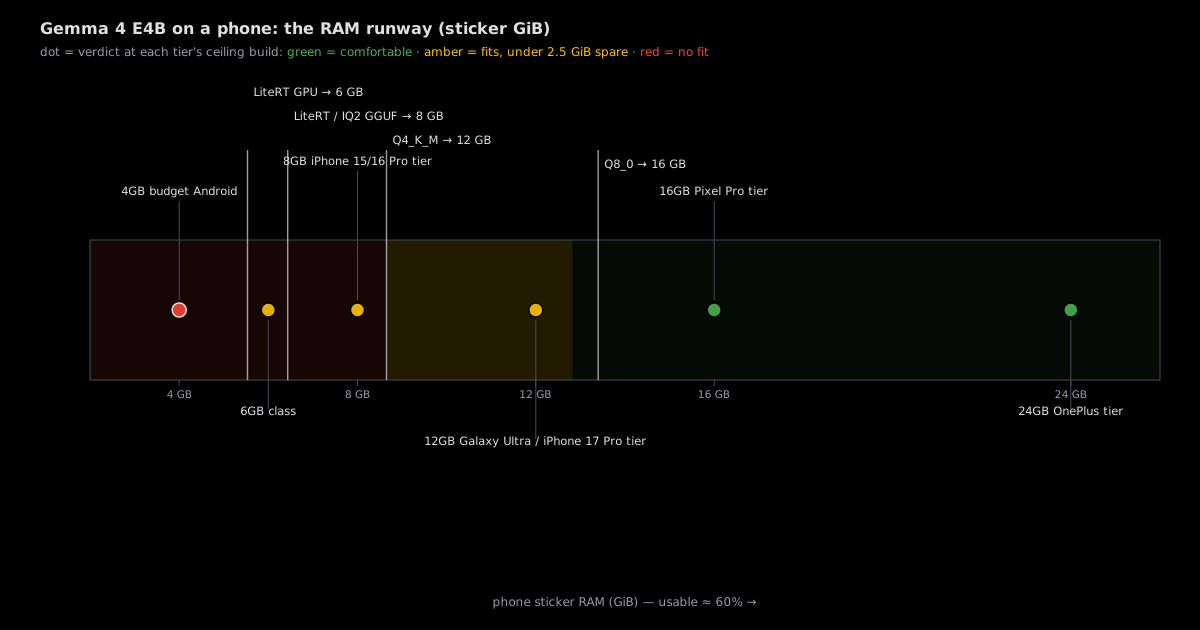
How much RAM at each build? (weights + 4K KV allowance + reserve)
| Build | Weights | Total needed | Smallest phone tier | Note |
|---|---|---|---|---|
| LiteRT GPU (.litertlm) | 2.8 GiB | 3.3 GiB | 6 GB door | razor on 6GB — the absolute floor measured |
| UD-IQ2_M GGUF (unsloth) | 3.3 GiB | 3.9 GiB | 8 GB | the smallest GGUF door measured |
| LiteRT full (.litertlm) | 3.4 GiB | 4.0 GiB | 8 GB | the zenn.dev entitlement boundary build measured |
| Q4_K_M GGUF (unsloth) — recommended | 4.6 GiB | 5.2 GiB | 12 GB | community default quality/size point measured |
| Q5_K_M GGUF (unsloth) | 5.1 GiB | 5.7 GiB | 12 GB | tight on 12GB (1.5 GiB spare) measured |
| Q8_0 GGUF (bartowski) | 7.5 GiB | 8.0 GiB | 16 GB | 16GB tight, 24GB comfortable measured |
Caliber: this page counts in GiB throughout — the site-wide internal caliber — and applies the 60% usable rule to the sticker number as-is (12 → 7.2 GiB usable). Tier names keep the marketing GB spelling; every computed cell above derives from the pinned file bytes in provenance. Context past 4K scales the KV allowance linearly: ~+0.12 GiB per extra 1K tokens (the 4K figure is ~0.47 GiB, scaled from a ~1.9 GiB@16K estimate), so running 8K adds ~0.47 GiB to every total above.
Is your phone enough? (find your phone class: one row tells you)
| Phone class | RAM | Usable | Biggest build that fits (ceiling) | Verdict |
|---|---|---|---|---|
| 4GB budget Android | 4 GiB | 2.4 GiB | none | NO |
| 6GB class | 6 GiB | 3.6 GiB | LiteRT GPU (3.3 GiB) | TIGHT · razor, 0.3 GiB spare |
| 8GB — iPhone 15/16 Pro tier | 8 GiB | 4.8 GiB | LiteRT full / IQ2_M GGUF | TIGHT · 0.8 GiB spare · Q4_K_M only w/ iOS entitlement |
| 12GB — Galaxy Ultra / iPhone 17 Pro tier | 12 GiB | 7.2 GiB | Q5_K_M | TIGHT · 2.0 GiB spare at recommended Q4_K_M |
| 16GB — Pixel Pro tier | 16 GiB | 9.6 GiB | Q8_0 | OK at Q4/Q5 · TIGHT at Q8_0 |
| 24GB — OnePlus flagship tier | 24 GiB | 14.4 GiB | Q8_0 | OK · 6.4 GiB spare |
Each phone class has exactly one ceiling — the biggest build that fits. KV cache is counted at 4K context with a runtime reserve — phones have no swap, so there is no soft landing past the line. iPhone 15/16 Pro tiers sit at 8GB; the iPhone 17 Pro generation moved the Pro tier to 12GB (Sept 2025), and Android flagships carry the 12–24GB end.
What phone should you buy for it? (the 12GB door logic)
| The logic | 12GB is the cheapest tier that runs the recommended Q4_K_M build at all (5.2 GiB total vs 7.2 GiB usable). Below it, 8GB phones run only the LiteRT/IQ2 small builds — and Q4_K_M only on iOS with a memory entitlement, razor-thin. Above it, 16GB buys comfort and a tight Q8_0 ceiling; 24GB is luxury for this model. |
| Why it fits | Per-layer embeddings keep the effective footprint edge-class: the measured 4.6 GiB file plus 4K KV stays inside the 60% usable rule with real margin — a full 8B dense model would not come close on 12GB |
| Representative hardware | Galaxy S Ultra tier, iPhone 17 Pro tier (12GB, Sept 2025); 16GB = Pixel Pro tier; 24GB = OnePlus flagship tier |
| Source | unsloth GGUF listing + litert-community listing · 2026-09-20 · measured |
⚠ Tight is a site-wide threshold: under 2.5 GiB of headroom. 12GB × Q4_K_M leaves 2.0 GiB (tight); the comfortable Q4_K_M tier is 16GB (4.4 GiB spare). On iOS the binding constraint is often the absolute per-app cap, not the percentage.
Tracked builds (actual file sizes, not theory)
| Build | Publisher | File size | 8GB phone | 12GB phone | Source |
|---|---|---|---|---|---|
| Q4_K_M (recommended) | unsloth | 4.6 GiB | NO · 5.2 iOS entitlement only | TIGHT · 5.2 | listing verified |
| Q4_K_M | bartowski | 5.0 GiB | NO · 5.6 | TIGHT · 5.6 | listing verified |
| Q4_K_M tag | ollama | 8.9 GiB | NO | NO · 9.5 | blob bundles vision/audio encoders — not a like-for-like file |
Q4_K_M is the sweet spot; the publisher decides the size within it: unsloth's build (4.6 GiB) undercuts bartowski's (5.0 GiB) by 0.4 GiB on the same quant name — on a 12GB phone that is 2.0 GiB vs 1.6 GiB of headroom, both tight, so unsloth is the default pick. The ollama row is the trap: the tag reads 9.6 GB (= 8.9 GiB, the same blob in decimal units) because the blob bundles the vision and audio encoders, and it fits no 12GB phone — read file listings, not tag pages. If you want Google's own runtime instead of GGUF, the LiteRT builds (2.8–3.4 GiB, table above) run in Google AI Edge Gallery and fit 8GB phones tight.
How to run it on a phone
| iOS | PocketPal · LLM Farm · Google AI Edge Gallery (LiteRT) |
| Android | PocketPal · llama.cpp (Termux or APK) · Google AI Edge Gallery (LiteRT) |
| Not MLC Chat | MLC Chat uses its own compiled model format and does not load GGUF files — for GGUF builds use PocketPal or llama.cpp. |
| Watch out | Thermal throttling cuts sustained tok/s on long generations; the OS reserve is why usable is 60%, not 100%; on iOS the per-app memory cap — not the percentage — is usually the binding constraint, and a memory entitlement raises it. |
Why phone RAM math is different
Phones have no swap: when memory runs out the app dies, not slows. In the community measurements we sampled, not one shows graceful degradation on a phone — iOS kills the app silently (jetsam), Android's LMK does the same; the boundary is a cliff, not a slope. One measured boundary sample sits exactly on this page's tight band: an 8GB iPhone fails to mmap the 3.65GB Gemma E4B LiteRT build without a memory entitlement and loads it with one (measurement, accessed 2026-09-13; the source's test unit is reported as an iPhone 17 Pro with 8GB physical RAM — read it as the 8GB iPhone class). KV cache shares one RAM pool with the OS and your background apps — that is why this page counts usable RAM at 60% of the sticker number. It is the same memory math as the GPU pages, with the budget switched from VRAM to unified phone RAM.
Running the same model on a desktop GPU is a different buying question — graphics-card VRAM, not the phone already in your pocket.
On thermals: short prompts feel instant almost everywhere the model fits. Sustained generation is where phones differ — a 2026 benchmark measured an iPhone 16 Pro dropping from ~40 tok/s peak to ~22.5 sustained over 20 iterations, and community reports put throttling onset at 30–60 seconds, so treat any speed number as a cold-start figure unless the source says otherwise (links in provenance).
The weights on this page are measured — GGUF and LiteRT file sizes read off the publishers' listings on 2026-09-20. What stays estimated is the total: KV cache at 4K context and a runtime reserve are added by simple arithmetic, and the KV figure is a scaled estimate, not a per-token measurement. The 0.60 usable rule stays an experience value — now with community measurements behind it — and if a better-supported figure shows up, the chart's zone boundaries move and the verdicts are recomputed.
Where every number comes from (every figure carries its tag)
Totals: labeled additive estimates — measured weights + KV allowance + runtime reserve.
| Tag | Slot | What it is | What the verdict can claim |
|---|---|---|---|
| measured | Weights | File sizes read off the publishers' Hugging Face listings, pinned revisions, accessed 2026-09-20: unsloth GGUF — UD-IQ2_M 3.3 GiB, Q4_K_M 4.6 GiB, Q5_K_M 5.1 GiB; bartowski GGUF — Q8_0 7.5 GiB; litert-community — LiteRT full 3.4 GiB, GPU variant 2.8 GiB; mmproj vision file 0.92 GiB separate. Totals add a 4K-context KV allowance (~0.47 GiB, scaled from a ~1.9 GiB@16K estimate — not a per-token measurement) plus ~0.09 GiB runtime reserve by simple addition. | Solid at file granularity — the weights are the files you will download; only the KV/reserve add-on is arithmetic. |
| reported | Usable = 60% rule | Experience value for the OS + background share, now backed by community measurements: the maintained per-device table spans ~49–81% usable (per-device memory-budget table, accessed 2026-09-13), with a 2026 forums report of iPadOS 26.4 silently cutting 8GB iPads to ~37.5% (Apple Developer Forums 826325, accessed 2026-09-13 — single source, treated as provisional); 8GB iPhones land at about half — ~4GB usable (community consensus, accessed 2026-09-13); and iOS enforces a hard per-app cap rather than a percentage — PocketPal PR #651 measured 52% → 70% with the memory entitlement (accessed 2026-09-13). 0.60 is our conservative default inside that range. | Directionally safe — it separates 4GB phones from 12GB phones. On iOS the binding constraint is often the absolute per-app cap, not the percentage, so real headroom can differ by device. |
| reported | App compatibility | PocketPal / LLM Farm / Google AI Edge Gallery (LiteRT) / llama.cpp — project pages, not re-tested by us on every device; E4B-class GGUF loads on Android flagships are user-reported (PocketPal issue #360, accessed 2026-09-13). MLC Chat uses its own compiled format and does not load GGUF files — listed here as a correction, not an option. | These apps load builds of this size class — stands on the linked pages, re-checkable by you. |
| reported | Thermal throttling 30–60% | Benchmarks + community measurements of sustained-generation slowdown on phone SoCs: iPhone 16 Pro measured ~40 → ~22.5 tok/s over 20 iterations (2026 thermal benchmark paper, accessed 2026-09-13; Apple-silicon LLM benchmark suite; community summary); a fan-cooled Xiaomi 12 Pro holds Gemma e4b Q4 at 7–8 tok/s 24/7 (measurement, accessed 2026-09-13). | Expect slowdown on long generations — never a cold-start speed promise. |
| unsloth/gemma-4-E4B-it-GGUF | bfc15c382204 | accessed 2026-09-20 |
| bartowski/google_gemma-4-E4B-it-GGUF | 029e94146666 | accessed 2026-09-20 |
| litert-community/gemma-4-E4B-it-litert-lm | 2eee7ac325f2 | accessed 2026-09-20 |
| SO 5887248 · per-device memory budget table | latest | accessed 2026-09-13 |
| zenn.dev · iOS memory entitlements measurement | 2026-06 | accessed 2026-09-13 |
| PocketPal PR #651 · entitlement 52%→70% | latest | accessed 2026-09-13 |
| Apple Developer Forums 826325 · iPadOS 26.4 cap cut | latest | accessed 2026-09-13 |
| 2026 thermal benchmark paper (arXiv 2603.23640) | 2026-03 | accessed 2026-09-13 |
| john-rocky/apple-silicon-llm-bench | latest | accessed 2026-09-13 |
| PocketPal issue #360 · E4B-class GGUF on Android flagship | latest | accessed 2026-09-13 |
FAQ
Can an iPhone 15 Pro run Gemma 4 E4B?
Yes — the smaller builds: LiteRT or IQ2_M GGUF (3.9–4.0 GiB total) fit tight in 8GB. The recommended Q4_K_M GGUF needs 5.2 GiB, which on iOS only fits with a memory entitlement.
Is 8GB RAM enough for Gemma 4 E4B on a phone?
Enough for the small builds, tight. The recommended Q4_K_M build wants a 12GB-class phone.
Can a 6GB Android phone run Gemma 4 E4B?
Barely — the LiteRT GPU build (2.8 GiB weights) just fits — razor, 0.3 GiB spare. It is the smallest door.
What app runs Gemma 4 E4B on a phone?
PocketPal or llama.cpp for GGUF builds; Google AI Edge Gallery for the LiteRT build. MLC Chat uses its own compiled format and does not load GGUF. Cap context at 4K.
unsloth or bartowski Q4_K_M — which file do I download?
Both are measured and both fit a 12GB phone tight. unsloth's Q4_K_M is 4.6 GiB against bartowski's 5.0 GiB — 2.0 GiB vs 1.6 GiB of headroom on 12GB — so unsloth is the default pick unless a guide tells you otherwise. Skip the ollama blob for this model: it reads 9.6GB because it bundles the vision and audio encoders.