How much VRAM does an LLM actually need?
Pick a model below and get the honest answer: measured file sizes per quantization, the GPU it actually fits, and the config where it runs best. No estimates dressed up as facts — every number carries an evidence tag.
How much VRAM does an LLM need?
Three things add up: the model's weights — we use measured file sizes from published builds, not parameter math; the KV cache, which grows with context length and follows the model's attention architecture; and a flat ~0.5 GiB of runtime overhead. Every component on a model page carries an evidence tag: measured reported provisional.
Scale check from the tables below: the smallest 24GB-card model, Qwen3-4B at Q4_K_M, totals 7.3 GiB at 32K context — measured file bytes plus the KV cache at that context, nothing else. KV is the moving part: on Qwen3.8-27B (Q4_K_M, pinned builds) it grows from 0.57 GiB at 8K context to 2.07 GiB at 32K, while the 16.2 GiB weight file stays put. The same math runs on phones with a smaller budget: the Gemma 4 E4B LiteRT build measures 2.8 GiB in weights — 3.3 GiB all-in with the 4K KV allowance and runtime reserve (litert-community, accessed 2026-09-20) — and the phone pages count usable RAM at 60% of the sticker number instead of VRAM.
Which GPU do I need for local LLMs?
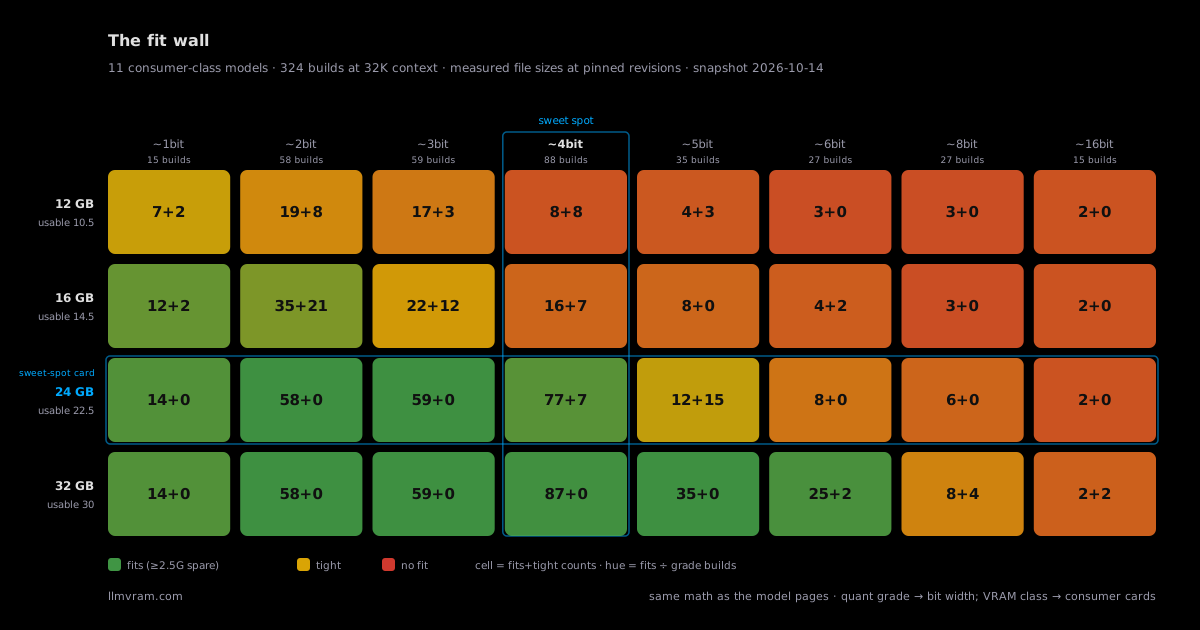
For most people, a 24GB card — RTX 3090 or 4090 — is the sweet spot: the 27B-class dense models and 30B-class MoE models in the table below run at Q4_K_M with usable context where a Q4 build exists (the two Bonsai models are low-bit only — their answers are the 1-bit/ternary builds). Four frontier models at the bottom exceed any consumer card; their pages price out the cloud and appliance exits instead. Llama 4 Scout is the near miss: its smallest measured build fits an RTX 5090 (32GB), tight.
The dividing line is the 24GB tier: nine of the sixteen models below have a Q4_K_M-class build that fits a 24GB card at 32K context; the two Bonsai models are the exceptions — their 24GB answers are the low-bit builds (Q1_0 and PTQ1_0). The five frontier models sit past that tier: Llama 4 Scout's smallest build (27.7 GiB) fits an RTX 5090 (32GB) tight, while the other four start where consumer cards stop — smallest measured builds run 77.7 GiB (DeepSeek-V4-Flash) to 435.9 GiB (Kimi K3) — so those four pages price cloud rentals and appliance exits instead of GPU tiers. Below 24GB, 12GB and 16GB cards still carry the small-model class: Qwen3-4B totals 7.3 GiB at Q4_K_M and 32K context, and each model page's GPU ladder lists the per-card ceiling. All of it rides on measured file sizes at pinned revisions, never parameter math.
The models people actually ask about
This isn't a directory of every model ever released — it's the shortlist people actually search for, each with its own page. Every answer below is the same number you'll find on that model's own page: measured at a pinned revision, tagged by evidence.
Runs on a 24GB card
| Model | Maker | Released | Params | Max ctx | Sweet-spot answer | Evidence |
|---|---|---|---|---|---|---|
| Ternary Bonsai 2 27B | PrismML | 2026-09-16 | 27.36B | 256K | 8.2 GiB PTQ1_0 · 32K ctx · RTX 4090 | provisional |
| Qwen3.8-27B | Alibaba | 2026-08-05 | 27.8B | 256K | 18.8 GiB Q4_K_M · 32K ctx · RTX 4090 | provisional |
| Bonsai-27B | PrismML | 2026-07-04 | 27B | 256K | 6.2 GiB Q1_0 · 32K ctx · RTX 4090 | provisional |
| Qwen3.6-27B | Alibaba | 2026-04-21 | 27B | 256K | 18.2 GiB Q4_K_M · 32K ctx · RTX 4090 | provisional |
| Gemma 4 31B | 2026-03-11 | 31B | 256K | 18.6 GiB Q4_K_M · 32K ctx · RTX 4090 | provisional | |
| Qwen3.5-27B | Alibaba | 2026-02-24 | 27B | 256K | 18.2 GiB Q4_K_M · 32K ctx · RTX 4090 | provisional |
| Qwen3-Coder-30B-A3B | Alibaba | 2025-07-31 | 30.5B | 256K | 20.8 GiB Q4_K_M · 32K ctx · RTX 4090 | provisional |
| Qwen3-30B-A3B | Alibaba | 2025-04-27 | 30.5B | 40K | 20.8 GiB Q4_K_M · 32K ctx · RTX 4090 | provisional |
| Qwen3-14B | Alibaba | 2025-04-27 | 14.8B | 40K | 13.9 GiB Q4_K_M · 32K ctx · RTX 4090 | provisional |
| Qwen3-4B | Alibaba | 2025-04-27 | 4B | 40K | 7.3 GiB Q4_K_M · 32K ctx · RTX 4090 | provisional |
| Mistral Small 3.1 | Mistral AI | 2025-03-11 | 24B | 128K | 18.8 GiB Q4_K_M · 32K ctx · RTX 4090 | provisional |
Beyond a 24GB card
| Model | Maker | Released | Params | Max ctx | Smallest measured build | Evidence |
|---|---|---|---|---|---|---|
| GLM-5.3-Flash | Zhipu AI | 2026-08-25 | 320B | 1M | 87.2 GiB 4× a 24GB card · KV out | measured |
| DeepSeek-V4-Flash-0731 | DeepSeek | 2026-07-31 | 284B | 1M | 77.7 GiB 4× a 24GB card · KV in* | measured |
| Kimi K3 | Moonshot AI | 2026-07-16 | 2.8T | 1M | 435.9 GiB 20× a 24GB card · KV in | measured |
| DeepSeek-V4-Flash | DeepSeek | 2026-04-22 | 284B | 1M | 77.7 GiB 4× a 24GB card · KV in* | measured |
| Llama 4 Scout | Meta | 2025-04-05 | 109B | 10M | 27.7 GiB fits an RTX 5090 (tight) · 2× a 24GB card · KV out | measured |
Card counts = build total ÷ 22.5 GiB usable per 24GB card, rounded up. KV marks: KV in = totals include a KV line · KV out = floor totals (weights + overhead, KV excluded) · * = the KV line is a reported value rescaled down from the source's published 1M figure — it over-counts at short context (the source's own note).
Runs on a phone
| Model | Maker | Released | Params | Max ctx | Phone-class answer | Evidence |
|---|---|---|---|---|---|---|
| Gemma 4 E4B on a phone | 2026-03-31 | 8B total / ~4.5B effective | 4K | 12GB-class phone, tight Q4_K_M · 4K ctx | provisional | |
| Gemma 3n E4B on a phone | 2025-06-26 | 4.4B effective / 7.8B total | 4K | 8GB-class phone, razor-tight Q4_K_M · 4K ctx | provisional | |
| Qwen3 4B on a phone | Alibaba | 2025-04-27 | 4B dense | 4K | 6GB-class phone, tight Q4_K_M · 4K ctx | provisional |
| Phi-4 mini on a phone | Microsoft | 2025-02-26 | 3.8B dense | 4K | 6GB-class phone, razor-tight Q4_K_M · 4K ctx | provisional |
| Llama 3.2 3B on a phone | Meta | 2024-09-23 | 3.2B dense | 4K | 6GB-class phone, tight Q4_K_M · 4K ctx | provisional |
Phone answers count usable RAM at 60% of the sticker number, at 4K context — each phone page carries the per-build table and the measured file sizes. All tracked phone builds are indexed in the on-phone section.
Badges: measured = real file bytes at a pinned revision · reported = sourced and re-checkable · provisional = mixed evidence, order-of-magnitude only. Measured bytes are pinned file-size sums from public Hugging Face repos (e.g. unsloth, ggml-org). All three tables are ordered by release date, newest first — same-day launches by parameter count (phone table ties: free RAM); positions never move when measurements or quant ladders update. Answers in the first table are Q4-first sweet spots at 32K context on an RTX 4090 where a Q4 build exists (the Bonsai models answer at Q1_0 / PTQ1_0) — each model page carries the full quantization ladder, longer-context math, and its pinned-sources table.
Can a Mac run local LLMs?
Yes — Apple Silicon Macs run local LLMs from unified memory, which acts like VRAM, and the memory tier sets the ceiling: 16 GB runs 4B-class models at Q4, 24 GB a 30B MoE, 64 GB the 27B class at full BF16, and 512 GB runs every tracked model (Kimi K3 only at 1-bit). The Mac page measures every tier's pick and ceiling across every build we track.
FAQ
How do I calculate the VRAM number for my setup?
Three things add up: the model's weights — we use measured file sizes from published builds, not parameter math; the KV cache, which grows with context length and follows the model's attention architecture; and a flat ~0.5 GiB of runtime overhead. Every component on a model page carries an evidence tag: measured, reported, or provisional.
Is a 24GB card really the sweet spot?
For most people, a 24GB card — RTX 3090 or 4090 — is the sweet spot: the 27B-class dense models and 30B-class MoE models in the table above run at Q4_K_M with usable context where a Q4 build exists (the two Bonsai models are low-bit only). Four frontier models at the bottom exceed any consumer card; their pages price out the cloud and appliance exits instead. Llama 4 Scout is the near miss: its smallest measured build fits an RTX 5090 (32GB), tight.
What if the model I want is too big for any GPU I can buy?
Four tracked models exceed every consumer card at every measured build — Kimi K3, GLM-5.3-Flash, and both DeepSeek-V4-Flash versions. Each of their pages prices the realistic exits instead of GPU tiers: cloud rental (DeepSeek-V4-Flash's smallest door is a single 192GB B200), a 512GB unified-memory appliance, a distillation ladder, private deployment, or the API. The near miss is Llama 4 Scout: its smallest measured build fits an RTX 5090 (32GB) tight, so it only needs the cloud if you don't have a 32GB card.
Can I run an LLM on my phone?
Yes, for small models. The phone pages track 3–8B models at Q4_K_M with 4K context: a 12GB-class phone runs Gemma 4 E4B (tight), an 8GB-class phone runs Gemma 3n E4B razor-tight, and 6GB-class phones run Qwen3-4B, Phi-4-mini, or Llama 3.2 3B. Phone math counts usable RAM at 60% of the sticker number — each phone page carries the per-build table and measured file sizes.
What numbers do I need to size a model myself?
Start from a published build: take the measured file size for your quantization tier, add KV cache for your context length, and add runtime overhead. On any model page here, that breakdown is itemized per component with pinned revisions and an evidence tag on each number.
What do I need to run an LLM locally?
A GPU whose VRAM fits the model at your quantization tier (or a unified-memory machine), a runtime such as llama.cpp or Ollama, and a published build of the model. Each model page lists the exact builds and revisions we measured, plus the cheapest hardware each one fits.
How much RAM does a phone need to run an LLM?
About 6 GB of RAM is the entry door and 12 GB is comfortable. At 4K context the tracked phone builds need roughly 2.8–5.2 GiB of free RAM at Q4_K_M, and phone math counts usable RAM at 60% of the sticker number — the OS and your background apps keep the rest. Below the line there is no swap: the app dies instead of slowing down. The phone table above lists which model class each RAM tier runs.
Does quantization hurt quality?
Some, and at 4-bit less than most people expect — that trade is exactly why Q4_K_M is the community default quality/size point: roughly a quarter of the 16-bit file size for a small quality step. Below about 3 bits the loss grows fast, and 1-bit builds are a last resort for fitting, not a default. Each model page's quant table marks the recommended point.
Can I run an LLM on a Mac?
Yes — Apple Silicon Macs run local LLMs from unified memory, which acts like VRAM: the same fit math applies (measured file size + KV cache + overhead) against the machine's total unified memory. A 24 GB Mac behaves roughly like a 24 GB card, and 32–128 GB machines open doors consumer GPUs cannot. The largest tracked models exceed every consumer card — even the biggest only fit a maxed-out 512 GB Mac Studio at 1-bit (wired limit raised) — so their pages price the cloud and appliance exits first. The Mac page measures every memory tier's pick and ceiling across every tracked build.