Bonsai-27B VRAM requirements
fits any 12GB card, 4.3 GiB to spare · at 4K it drops to ≈4.4 GiB — an 8GB-class phone, tight
Bonsai-27B is PrismML's 1-bit QAT derivative of Qwen3.6-27B — an existing 27B checkpoint pushed through one-bit quantization-aware training, not a native BitNet: the Q1_0 GGUF measures 3.54 GiB (prism-ml/Bonsai-27B-gguf, pinned) and the MLX 1-bit build 4.78 GiB (prism-ml/Bonsai-27B-mlx-1bit). That file size is the headline: at 4K context the Q1_0 build totals ≈4.4 GiB — an 8GB-class phone runs a 27B model, tight, and a 12GB-class phone runs it with room (PrismML reports ~11 tok/s on an iPhone 17 Pro Max). On a GPU the same build totals 6.2 GiB at 32K — any 12GB card, 4.3 GiB spare. The trade-offs are quality — PrismML's own numbers put the 1-bit build between Q2 and Q4_K_XL — and runtime: GGUF builds need PrismML's llama.cpp fork (or the MLX build + fork).
Bonsai-27B is PrismML's 1-bit QAT derivative of Alibaba's Qwen3.6-27B: the same 64-layer GDN hybrid (48 Gated-DeltaNet linear-attention layers + 16 full-attention, config.json), re-quantized to true 1-bit — Q1_0_g128, one sign bit per weight with a shared FP16 scale per 128-weight group, 1.125 bits/weight measured. Weights drop from 51 GiB in BF16 to 3.5 GiB. It runs on PrismML's forks of llama.cpp (CUDA) and MLX (Apple); reported community numbers: ~11 tok/s on an iPhone 17 Pro Max, 44 tok/s on an M5 Max (PrismML, linked in sources). A ternary Q2_0 line (~1.7 bpw) and an MLX 1-bit build round out the ladder.
Data verified · sources pinned in Where every number comes from
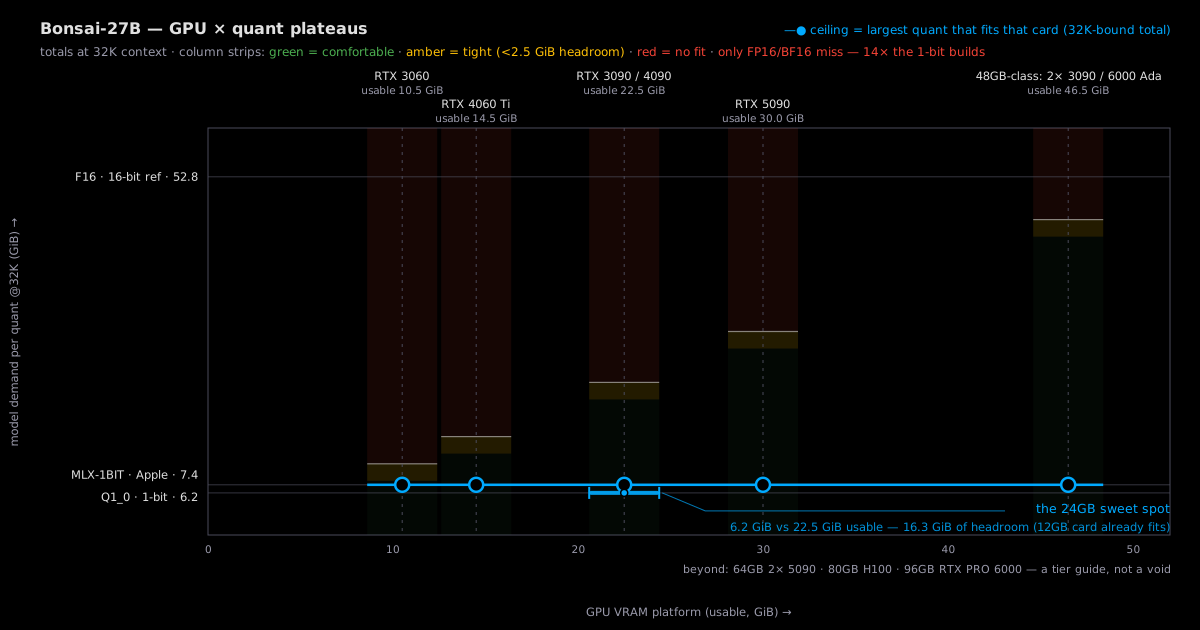
How much VRAM at each quantization? (weights + overhead + 4K KV, batch 1)
| Quantization | VRAM needed @4K | KV @32K provisional i · beyond the @4K column | Smallest tracked fit | Note |
|---|---|---|---|---|
| Q1_0 | 4.4 GiB | 2.148 GiB | RTX 3060 12GB | measured · at 32K: 6.2 GiB |
| MLX_1BIT | 5.7 GiB | 2.148 GiB | RTX 3060 12GB | measured · at 32K: 7.4 GiB |
| F16 | 51.0 GiB | 2.148 GiB | — | measured · at 32K: 52.8 GiB |
GB vs GiB: card names are the manufacturer's nominal GB; totals here are GiB (230 bytes) — a "24GB" card holds 24 GiB, and a file quoted 3,803,452,480 B in decimal is the same 3.5 GiB. Caliber →
The 48GB-class doors, spelled out: a dual-GPU combo (2× 24GB; not one card doubled), a workstation card (RTX 6000 Ada), or a Mac Studio (unified memory; runs, slower tok/s). For Bonsai they only matter for the FP16 builds — the 1-bit builds fit anywhere.
How this page computes the numbers (reproduce any cell)
- usable VRAM = nominal minus reserve, per card: 12GB → 10.5 GiB, 16GB → 14.5 GiB, 24GB → 22.5 GiB, 32GB → 30.0 GiB.
- total@32K = weights + overhead + KV@32K; KV@32K = 2.148 GiB (config-derived — 70,386 B/token effective at 32K; hybrid models carry a constant state on top, composition in sources).
- total@4K (main column) = total@32K − (KV@32K − 0.148) × 7/8 — the constant state (0.148 GiB on this hybrid) is not scaled down at shorter context; only the linear part divides by eight.
- The "≤~XK ctx" note = 8K + 32K × (usable − total@8K) ÷ KV@32K — the context length that exactly fills the card (KV grows linearly with context on this model).
- A build fits a card at 32K when total@32K ≤ usable; tight = under 2.5 GiB of headroom, one site-wide threshold.
Is your GPU enough? (find your card: one row tells you)
| Your GPU | VRAM | Biggest quant that fits (ceiling) | How it feels |
|---|---|---|---|
| RTX 3060 12GB | 12 GB | MLX_1BIT (1-bit) · 7.4 GiB | 3.1 GiB spare at 32K (incl KV bound) |
| RTX 4060 Ti 16GB | 16 GB | MLX_1BIT (1-bit) · 7.4 GiB | 7.1 GiB spare at 32K (incl KV bound) |
| RTX 3090 24GB | 24 GB | MLX_1BIT (1-bit) · 7.4 GiB | 15.1 GiB spare at 32K (incl KV bound) |
| RTX 4090 24GB | 24 GB | MLX_1BIT (1-bit) · 7.4 GiB | 15.1 GiB spare at 32K (incl KV bound) |
| RTX 5090 32GB | 32 GB | MLX_1BIT (1-bit) · 7.4 GiB | 22.6 GiB spare at 32K (incl KV bound) |
Quants stack by size: each GPU has exactly one ceiling — a card that runs a bigger build runs every smaller one. Main-column totals price the 4K load (weights + overhead + the KV term at 4K — the community runtime default); each row's Note prices the full 32K load this page promises (Q1_0 at 32K = 6.2 GiB), and the CPU path trades tok/s for the same headroom on plain RAM.
What GPU should you buy for it? (the 24GB sweet spot logic)
| The logic | Bonsai breaks the site's usual advice: there is no reason to buy up. The whole 32K config is 6.2 GiB, so a used RTX 3060 12GB (4.3 GiB spare) is already overspecced; the interesting floors are an 8GB card at 4K context (≈4.4 GiB) and a pure-CPU box — the 1-bit build exists precisely so 27B-class quality runs where 27B-class VRAM doesn't. |
| Why it fits | 1-bit weights are 3.5 GiB where BF16 is 51: the entire memory bill collapses to the size of a KV cache. At 32K the classic bound adds 2.1 GiB (16 full-attention layers) plus 0.5 GiB of runtime overhead — 6.2 GiB total. |
⚠ Tight is a site-wide threshold: under 2.5 GiB of headroom — and on this page almost nothing is tight. Q1_0 @32K leaves 4.3 GiB on a 12GB card and 16.3 GiB on 24GB; even the ceiling build (MLX-1BIT, 7.4 GiB) clears 12GB with 3.1 GiB spare. The only no-fit rows are FP16 and BF16 (52.8/53.6 GiB at the bound) — datacenter doors. All totals carry the classic KV bound, so these verdicts are stable, not flip-check rows.
Tracked builds (actual file sizes, not theory)
| Build | Publisher | File size | 24GB @32K | Source |
|---|---|---|---|---|
| Q1_0 | prism-ml | 3.5 GiB | OK ON 12G · 6.2 | HF @f10afb35 verified |
| MLX_1BIT | prism-ml | 4.8 GiB | OK ON 12G · 7.4 | HF @ef22f239 verified |
| F16 | prism-ml | 50.1 GiB | NO · 52.8 | HF @f10afb35 verified |
One publisher, four builds: prism-ml ships the Q1_0 GGUF (3.5 GiB, the true-binary build this page recommends), an MLX 1-bit build for Apple silicon (4.8 GiB), and the FP16/BF16 references (50–51 GiB) — the same architecture un-quantized, 14× the binary build's size. PrismML's ternary Q2_0 line (~1.7 bpw, between Q2 and Q4 quality per their own benchmark) is delisted in the database — absent from the pinned tree and marked delisted pending a live re-check (the channel was unreachable on delist day, so the annotation is honest about the gap) — so it is not priced here; if a live listing shows it again, the delist flips and it re-enters the table. PrismML's own quality numbers: IQ2_XXS-class 72.7 vs Q4_K_XL 85.0 average score, ternary in between (linked, reported).
Self-host or API?
API prices are sourced from OpenRouter (linked, not re-verified). We have not pinned a price for Bonsai-27B, so the breakeven cell stays empty rather than guessing. When a price is pinned, this block compares API cost per million tokens against self-hosting on your own card.
Where every number comes from (every figure carries its tag)
Totals: measured weights + KV as the classic stacked upper bound (GDN hybrid: full-attention growth + linear constant state, config-derived, actual ≤ value) + measured overhead. This page exists for one config: the 1-bit 27B × 32K context — the smallest full-quality-config footprint in the database, and the page where the GPU ladder stops mattering.
| Tag | Slot | What it is | What the verdict can claim |
|---|---|---|---|
| reported | model | Hugging Face config.json (hypothesis-parameter carrier; nested Qwen3.5 text_config, vision tower excluded from sizing) | Tight, conditional — stands on the linked source, re-checkable by you. |
| reported | static | Hugging Face model page (prism-ml/Bonsai-27B-unpacked) | Tight, conditional — stands on the linked source, re-checkable by you. |
| provisional | kv | KV cache @ 32K — no published measurement for Bonsai-27B in our sources (1-bit long-tail model); the page shows the classic stacked bound instead: 2.0 GiB growth (16 full-attention layers × 65,536 B/token) + 0.148 GiB GDN constant state (48 linear layers), config-derived, actual ≤ value | Very likely right, order of magnitude only — replaced the moment measured values land. |
| measured | overhead | Deployment overhead — llama.cpp FA-on compute buffer anchor (507 MiB; measured empirical; same constant as the other champion pages) | Determinate — "it runs" means it runs. |
| reported | static | PrismML quality/runtime claims (11 tok/s iPhone 17 Pro Max, 44 tok/s M5 Max, ternary between Q2 and Q4_K_XL) — prism-ml/Bonsai-27B-gguf model card + kotonia.ai writeup | Tight, conditional — stands on the linked source, re-checkable by you. |
| Hugging Face config.json (hypothesis-parameter carrier; nested Qwen3.5 text_config, vision tower excluded from sizing) | @d619b272 | accessed 2026-09-01 |
| Hugging Face model page (prism-ml/Bonsai-27B-unpacked) | @d619b272 | accessed 2026-09-01 |
| KV cache @ 32K — no published measurement for Bonsai-27B in our sources (1-bit long-tail model); the page shows the classic stacked bound instead: 2.0 GiB growth (16 full-attention layers × 65,536 B/token) + 0.148 GiB GDN constant state (48 linear layers), config-derived, actual ≤ value | latest | — |
| Deployment overhead — llama.cpp FA-on compute buffer anchor (507 MiB; measured empirical; same constant as the other champion pages) | latest | accessed 2026-09-05 |
| PrismML quality/runtime claims (11 tok/s iPhone 17 Pro Max, 44 tok/s M5 Max, ternary between Q2 and Q4_K_XL) — prism-ml/Bonsai-27B-gguf model card + kotonia.ai writeup | latest | accessed 2026-09-14 |
FAQ
Can Bonsai-27B run on a consumer GPU?
On essentially any of them, at full 32K context. The Q1_0 build totals 6.2 GiB (weights + overhead + the 2.1 GiB classic KV bound) — an RTX 3060 12GB runs it with 4.3 GiB to spare, and even an 8GB card runs it at 4K context (≈4.4 GiB). This is the point of the model: a 27B-class footprint smaller than most 7B quants.
How is Bonsai-27B only 3.5 GiB?
It is a true 1-bit quantization of Qwen3.6-27B by PrismML: each weight is stored as a single sign bit (Q1_0_g128), with one FP16 scale factor shared per group of 128 weights — 1.125 measured bits per weight. That collapses the 51 GiB BF16 weights to 3.5 GiB, a 14× reduction. A ternary line (Q2_0, ~1.7 bpw, values in {-1, 0, +1}) sits between the binary build and conventional quants on both size and quality.
What's the catch — what does 1-bit cost?
Quality and runtime. PrismML's own benchmark places the ternary build between a conventional Q2 and Q4_K_XL (IQ2_XXS-class 72.7 vs Q4_K_XL 85.0 average score; the binary Q1_0 lands below ternary) — better than any 2-bit, not equal to Q4. And the GGUF builds need PrismML's llama.cpp fork (upstream support is not merged), with the MLX build needing their mlx fork — check the pinned sources before planning a deployment.
How much VRAM does Bonsai-27B need at 32K context?
6.2 GiB all-in for Q1_0: 3.5 GiB weights + 0.5 GiB runtime overhead + 2.1 GiB KV bound. The KV figure is the classic stacked bound for the GDN hybrid architecture (16 full-attention layers grow linearly with context; the 48 Gated-DeltaNet linear layers hold a constant 0.148 GiB state) — config-derived, unmeasured, actual ≤ value. At 4K context the KV term drops eightfold and the total lands at ≈4.4 GiB.
Does Bonsai-27B run on a CPU or a phone?
That is its home turf. 1-bit models are compute-light and memory-trivial: PrismML reports ~11 tok/s on an iPhone 17 Pro Max and 44 tok/s on an M5 Max (linked, reported — not re-measured by us), and community reports put full 32K-context use at ~10 GB of memory on an M4 Pro. Use the GGUF + PrismML's llama.cpp fork for CPU/CUDA, or the MLX build on Apple silicon.
Why is the GPU ladder's ceiling the MLX build instead of Q1_0?
Because the ceiling rule is 'the biggest tracked build that fits' — and the MLX 1-bit build (4.8 GiB of weights) is bigger than the Q1_0 GGUF (3.5 GiB) while still fitting every listed card. On NVIDIA hardware the practical pick is the Q1_0 GGUF — the MLX file is Apple's format — and the hero, the buy section, and the chart's highlighted band all price Q1_0.
How does this site compute these VRAM numbers?
Weights are measured file sizes at pinned revisions (sources below); totals add runtime overhead plus the KV cache at 32K context. Here KV@32K = 2.148 GiB: 65,536 B/token across the 16 full-attention layers plus the 0.148 GiB GDN constant state (config-derived). A build fits a card at 32K when the total clears usable VRAM (nominal minus reserve), and tight means under 2.5 GiB of headroom — the full formula lives in the method box under the quantization table.