Qwen3-Coder-30B-A3B VRAM requirements
fits any 24GB card, tight — 1.7 GiB to spare · the standard Qwen3-30B-A3B measures the same 20.8 — the two unsloth repos agree to the last rounding; same weights, different training
Qwen3-Coder-30B-A3B needs 18.5 GiB at Q4_K_M (unsloth build) at 8K context and 20.8 GiB at 32K (reported KV counted) — any 24GB card runs it, tight, 1.7 GiB to spare. Every headline number on this page matches the standard Qwen3-30B-A3B's (fits agree within 0.1 GiB — the two unsloth repos are measured separately, and the official FP8 repos are the one exception, see the FAQ): the Coder is the same 30.5B-A3B MoE with coding-specialized post-training and a 256K native context (the standard stops at 40K). MoE residency rule stands — all 30.5B parameters stay in VRAM; 3.3B active buys speed, not GB. The densest 24GB fit is Q4_1 at 21.4 GiB. Searching "qwen3 30b a3b" lands on both — the FAQ below answers which one to download.
ollama run qwen3-coder:30b — fits any 24GB card, tight at 32K (Ollama boots at 4K context — /set parameter num_ctx 32768 for the full window).Qwen3-Coder-30B-A3B is Alibaba's July 2025 coding refresh: the same 30.5B-A3B MoE as the standard model — 128 experts, 3.3B active, 48 full-attention GQA layers (config.json) — with code-specialized post-training and a 256K native context window (the standard's config stops at 40K). A key-by-key config diff against the standard A3B shows every attention and MoE parameter identical; only the context ceiling moved. VRAM follows the weights, not the training: file sizes identical to the last rounding, fits identical, and the MoE residency rule — every expert stays in VRAM whatever the active count.
Data verified · sources pinned in Where every number comes from
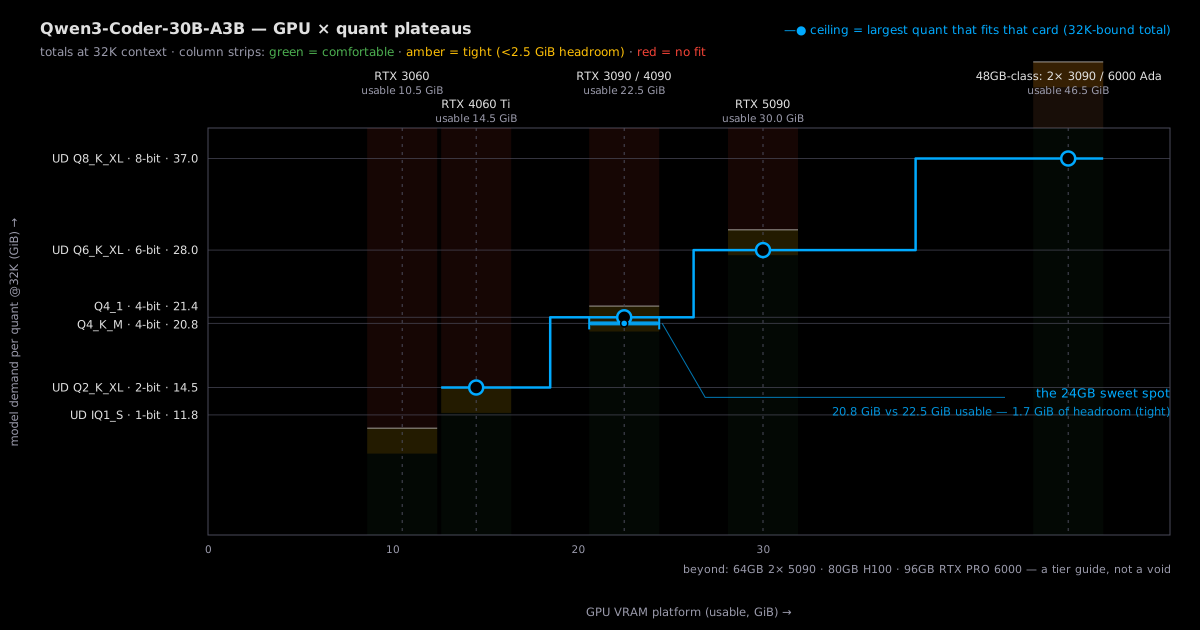
How much VRAM at each quantization? (weights + overhead + KV @32K, batch 1)
| Quantization | VRAM needed @32K | KV @32K reported i · already in the left column | Smallest tracked fit | Note |
|---|---|---|---|---|
| UD_IQ1_S | 11.8 GiB | 3 GiB | RTX 4060 Ti 16GB | measured · main column = the full 32K load |
| UD_Q2_K_XL | 14.5 GiB | 3 GiB | RTX 4060 Ti 16GB | measured · main column = the full 32K load |
| Q4_K_M | 20.8 GiB | 3 GiB | RTX 3090 24GB | measured · main column = the full 32K load |
| Q4_1 | 21.4 GiB | 3 GiB | RTX 3090 24GB | measured · main column = the full 32K load |
| UD_Q6_K_XL | 28.0 GiB | 3 GiB | RTX 5090 32GB | measured · main column = the full 32K load |
GB vs GiB: card names are the manufacturer's nominal GB; totals here are GiB (230 bytes) — a "24GB" card holds 24 GiB, and a file quoted 18,556,686,912 B in decimal is the same 17.3 GiB. Caliber →
The 48GB-class doors, spelled out: a dual-GPU combo (2× 24GB; not one card doubled), a workstation card (RTX 6000 Ada), or a Mac Studio (unified memory; runs, slower tok/s).
How this page computes the numbers (reproduce any cell)
- usable VRAM = nominal minus reserve, per card: 12GB → 10.5 GiB, 16GB → 14.5 GiB, 24GB → 22.5 GiB, 32GB → 30.0 GiB.
- total@32K = weights + overhead + KV@32K; KV@32K = 3 GiB (config-derived — 98,304 B/token effective at 32K; hybrid models carry a constant state on top, composition in sources).
- The main column already prices the full 32K load, KV included; shorter-context figures live in the caption and FAQ where relevant.
- A build fits a card at 32K when total@32K ≤ usable; tight = under 2.5 GiB of headroom, one site-wide threshold.
Is your GPU enough? (find your card: one row tells you)
| Your GPU | VRAM | Biggest quant that fits (ceiling) | How it feels |
|---|---|---|---|
| RTX 3060 12GB | 12 GB | — | — |
| RTX 4060 Ti 16GB | 16 GB | UD_Q2_K_XL (2-bit) · 14.5 GiB | 0.03 GiB spare at 32K |
| RTX 3090 24GB | 24 GB | Q4_1 (4-bit) · 21.4 GiB | 1.1 GiB spare at 32K |
| RTX 4090 24GB | 24 GB | Q4_1 (4-bit) · 21.4 GiB | 1.1 GiB spare at 32K |
| RTX 5090 32GB | 32 GB | UD_Q6_K_XL (6-bit) · 28.0 GiB | 2.0 GiB spare at 32K |
Quants stack by size: each GPU has exactly one ceiling — a card that runs a bigger build runs every smaller one. Main-column totals price the 32K load (weights + overhead + reported KV @32K); shorter context lowers every row by most of the KV term, and CPU offload trades tok/s for headroom.
What GPU should you buy for it? (the 24GB sweet spot logic)
| The logic | 24GB is the tier that runs Q4_K_M at 32K: 20.8 GiB with the reported KV counted, 1.7 GiB to spare — tight, and the same math as the standard A3B. Below it, 16GB tops out at UD-Q2_K_XL (a 14.5 GiB knife-edge) and 12GB is 8K-only. Above it, an RTX 5090 32GB reaches UD-Q6_K_XL; nice, not necessary. |
| Why it fits | MoE saves compute, not memory: all 30.5B parameters (17.3 GiB at Q4_K_M) must sit in VRAM whatever the active count, and the KV rides a 3.0 GiB reported figure at 32K — the 3.3B-active design buys tok/s; the GB bill is a 30B-class bill, identical to the standard model's. |
⚠ Tight is a site-wide threshold: under 2.5 GiB of headroom. Q4_K_M @32K leaves 1.7 GiB on a 24GB card — tight by the rule, comfortable in practice. The densest fit Q4_1 totals 21.4 GiB (1.1 to spare). Just past the line: Q5_K_M totals 23.7 GiB — 1.2 GiB over the 22.5 GiB usable; at 8K context it fits (21.5 GiB, 1.0 to spare), and the GPU ladder prices that. All totals carry the reported KV figure, so these verdicts are stable, not flip-check rows.
Tracked builds (actual file sizes, not theory)
| Build | Publisher | File size | 24GB @32K | Source |
|---|---|---|---|---|
| UD_IQ1_S | unsloth | 8.3 GiB | OK · 11.8 | HF @b17cb02d verified |
| UD_Q2_K_XL | unsloth | 11.0 GiB | OK · 14.5 | HF @b17cb02d verified |
| Q4_K_M | unsloth | 17.3 GiB | TIGHT · 20.8 | HF @b17cb02d verified |
| Q4_1 | unsloth | 17.9 GiB | TIGHT · 21.4 | HF @b17cb02d verified |
| UD_Q6_K_XL | unsloth | 24.5 GiB | NO · 28.0 | HF @b17cb02d verified |
Same-name, different-builds — the honest mirror case for this model: bartowski and ggml-org ship no Coder GGUF ladder (both 404 from our channel probes — a negative-existence note, not proof they never will), so unsloth is the tracked ladder, one row per build. The official FP8 repo is Qwen's own safetensors, pinned. Where 24GB ends at 32K: Q4_1 at 21.4 GiB; Q5_K_M (23.7 GiB) is the first door that misses, and Q8_0 (33.7 GiB) needs 48GB-class.
Self-host or API?
Why in / out? Output tokens cost more than input: a prompt is read in one parallel pass, while output is generated token-by-token — costlier to serve. For example, qwen3-coder-30b-a3b listed at $0.07 in / $0.28 out per 1M tokens in the 2026-09-18 OpenRouter snapshot; blended at a typical chat mix (4 input : 1 output) ≈ $0.11/1M.
API prices float; the crossover moves less than one decade either way — so this page answers the question that doesn't need live prices: how much monthly usage makes self-hosting worth considering at all.
| Monthly usage | Verdict | Why |
|---|---|---|
| < 30M tokens | API | Even the cheapest self-host ($30/mo) never breaks even against the API bill at this usage — don't bother calculating. |
| 30M-300M tokens | Conditional | The decisive variable is whether you already own a 24GB card — amortization dominates the self-host bill. |
| > 300M tokens | Self-host | Per-token API billing stops scaling here; consider a managed dedicated instance too — at 1B+ tokens/mo it often beats DIY. |
Robustness: at 0.10/1M blended the crossover sits near 600 tokens/mo; at 0.20/1M near 150/mo. The three bands hold under ±2.5× API-price and ±2× self-host-cost floats. Self-host cost basis: $800-1900 GPU amortized over 30 months ($27-63/mo) + ~350W × 4h/day × $0.15/kWh (≈ $6/mo). Live prices via OpenRouter (linked, not re-verified by us); the band is a 30B-class reference, not a pinned price for this model.
Where every number comes from (every figure carries its tag)
Totals: measured weights + reported KV (community measurement, linked — same-architecture derivation verified key-by-key against the standard A3B) + measured overhead. This page exists for one config: the 30B-class coding MoE × Q4_K-class quant × 32K context on a 24GB card — same footprint as the standard model, so the choice is training, not hardware.
| Tag | Slot | What it is | What the verdict can claim |
|---|---|---|---|
| reported | model | Hugging Face config.json (hypothesis-parameter carrier; key-by-key diff vs the standard A3B config on file) | Tight, conditional — stands on the linked source, re-checkable by you. |
| reported | static | Hugging Face model page | Tight, conditional — stands on the linked source, re-checkable by you. |
| reported | kv | KV cache @ 32K — kaitchup measured writeup: 'At 32k context, batch/concurrency = 1, that is about 3.22 GB (or 3.0 GiB)'; applied to the Coder via same-architecture derivation (config diff vs the standard A3B: only max_position_embeddings 40960→262144 — per-token constant identical) | Tight, conditional — stands on the linked source, re-checkable by you. |
| measured | overhead | Deployment overhead — llama.cpp FA-on compute buffer anchor (507 MiB; measured empirical; same constant as the other champion pages) | Determinate — "it runs" means it runs. |
| Hugging Face config.json (hypothesis-parameter carrier; key-by-key diff vs the standard A3B config on file) | @b2cff646 | accessed 2026-08-31 |
| Hugging Face model page | @b2cff646 | accessed 2026-08-31 |
| KV cache @ 32K — kaitchup measured writeup: 'At 32k context, batch/concurrency = 1, that is about 3.22 GB (or 3.0 GiB)'; applied to the Coder via same-architecture derivation (config diff vs the standard A3B: only max_position_embeddings 40960→262144 — per-token constant identical) | latest | accessed 2026-09-05 |
| Deployment overhead — llama.cpp FA-on compute buffer anchor (507 MiB; measured empirical; same constant as the other champion pages) | latest | accessed 2026-09-05 |
FAQ
Qwen3-Coder-30B-A3B or the standard Qwen3-30B-A3B — which one do I download?
Same hardware, different training. Both are the 30.5B-A3B MoE with the same-size weight files — the two unsloth repos measure within 0.1 GiB of each other (separately harvested listings, not one copy), Q4_K_M totals 20.8 GiB at 32K context on either page, and the ladders match to one decimal. The one exception: the official FP8 repos differ (29.0 vs 30.2 GiB of weights, Qwen's own safetensors) — the identical part is the Q4-and-below GGUF ladder you will actually download. Download the Coder for IDE, agentic, and repo-scale coding work: its post-training is code-specialized and its native context is 256K (the standard's config stops at 40K). Download the standard for general chat and mixed workloads. If a guide says "qwen3 30b a3b" without the Coder name, check which task it describes — the search results mix the two on purpose and on accident.
Does Qwen3-Coder-30B-A3B fit in 24GB VRAM?
Yes, tight. The Q4_K_M build totals 20.8 GiB at 32K context against 22.5 GiB usable on an RTX 3090 24GB or 4090 24GB — 1.7 GiB to spare. The densest build that fits is Q4_1 at 21.4 GiB (1.1 GiB to spare). The footprint is identical to the standard Qwen3-30B-A3B: same weights, same fits.
How much VRAM does Qwen3-Coder-30B-A3B need at Q4_K_M?
20.8 GiB at 32K context: 17.3 GiB weights + 0.5 GiB runtime overhead + 3.0 GiB KV cache. The KV figure is reported (kaitchup: 'about 3.22 GB (or 3.0 GiB)' at 32K context, batch 1 — 48 GQA layers × 4 KV heads × 128 head dim); the Coder's config differs from the standard A3B only in the context ceiling (256K vs 40K), so the same per-token constant applies by derivation, not by copy. At 4K context the KV term shrinks eightfold (≈0.4 GiB), so the same build runs in ≈18.2 GiB. The short form (ollama run qwen3-coder:30b) pulls the ollama Q4_K_M build.
What is the smallest GPU that runs Qwen3-Coder-30B-A3B?
At 32K context an RTX 3060 12GB tops out at nothing — the smallest build totals 11.8 GiB against 10.5 GiB usable. At 8K context that build (UD_IQ1_S, 9.6 GiB) fits, tight. A 16GB card reaches UD_Q2_K_XL at 32K — 14.5 GiB against 14.5 GiB usable, a knife-edge fit, real but with only 0.03 GiB to spare. Q4_K_M needs a 24GB card.
Can Qwen3-Coder-30B-A3B run above Q4 on a 24GB card?
Not at 32K: Q5_K_M totals 23.7 GiB, 1.2 GiB over the 22.5 GiB usable — at 8K context it fits (21.5 GiB, 1.0 to spare). The 24GB ceiling at 32K is Q4_1 (21.4 GiB); the GPU ladder prices that. An RTX 5090 32GB reaches UD-Q6_K_XL at 28.0 GiB; Q8_0 (33.7 GiB) needs 48GB-class hardware.
Which Q4 should I pick — is there a same-name spread like the other models?
No spread to navigate here: bartowski and ggml-org ship no Coder GGUF ladder (both 404 from our channel probes — honest negative existence, they may appear later), so the tracked ladder is unsloth's, one row per build, and the official FP8 repo is Qwen's own. The one caveat is the usual one — the ollama blob bundles more than the GGUF files, so read file listings, not tag pages.
How does this site compute these VRAM numbers?
Weights are measured file sizes at pinned revisions (sources below); totals add runtime overhead plus the KV cache at 32K context. Here KV@32K = 3.0 GiB, the reported figure carried from the standard A3B (same architecture, config diff verified key-by-key). A build fits a card at 32K when the total clears usable VRAM (nominal minus reserve), and tight means under 2.5 GiB of headroom — the full formula lives in the method box under the quantization table.